
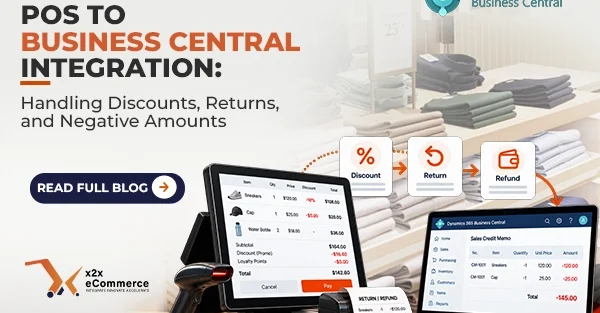
POS integration with Microsoft Dynamics 365 Business Central is easy if customers pay for products at their full value. However, real-world situations in retailing are more complicated. Customers can have loyalty points. They can provide coupon codes. They can return products purchased last week; and they require refunds. Working with discounts, returns, and negative values is what typically causes problems for POS integration with Business Central resulting in unpleasant discrepancies in inventory and General Ledger (G/L).
Here is how to design your integration so that it works perfectly in the complicated retail environment.
Managing Complex Discount Calculations
There are many types of discounts; for example, there are line-item discounts, transactional discounts, manager overrides, and loyalty discounts. The most common error developers make is calculating the discounted amount at the POS terminal and passing it to BC in one aggregated number. In doing so, they deprive BC of important margin information that is required to calculate COGS and measure the performance of the promotion.
It is important to map discount values in detail at the line-item level. Line-Item discounts can be mapped to “Line Discount %” or “Line Discount Amount” on BC’s Sales Invoice/Sales Order.
Regarding transaction discounts (“$10 off your total order,” etc.), do not use the flat line with minus at the bottom of the invoice. Apply proportional discount to each product on the cart level in POS middleware as a line discount. It guarantees that the accuracy of the inventory valuation and cost of goods sold calculation will be perfect. Regarding loyalty points/credits, create a special non-inventory item in BC which is debited against a liability G/L account.
The Nuances of Returns
The concept of return is not just about making negative sales. Whenever a customer returns any item to you, you will need to make sure that your system integrates with the proper reversal. Not only the finances but also the stock without disrupting any daily transactions you may be making.
Firstly, you should know what document type to use on BC. While you can use Sales Invoice and create negative quantities, it is better if you can use Sales Credit Memos on BC.
Then take care of the inventory properly. The returned item should be put back into inventory at the location of the store. Your POS should transmit the return as positive quantities on a Credit Memo so that BC can increase the quantity in inventory. In case the item is damaged and unsellable, it should be sent by the integration to the “damaged goods” location in BC and not to the sellable location. Additionally, you must deal with the refunds properly.
Handling of Negative Numbers and Validation
To handle negative numbers like return items, reverse loyalty points, or a partial refund, establish a proper validation logic. It is known that Business Central is too strict when it comes to balancing debits and credits. In case of just a penny being incorrect, the entire post fails.
When handling negative numbers, you need to ensure proper symmetry in payment mappings. If credit card sales are mapped to GL Account 10100, then the credit card refund should be mapped to the exact same GL Account but with a negative number.
Also, it might get difficult when handling returns in case the price of any item has changed in BC after the initial purchase. You need to make sure that your middleware gets the exact transaction ID of the transaction and uses the historical price.
Conclusion
To account for discounts, returns, and negative amounts, it is important that you go beyond simple data synchronization. Ensure that discounts are properly account for in the line level. So, the returns done through Credit Memos, and negative amounts are always verified using historical data, you can guarantee that your financial data will remain intact. A proper POS integration is not just about transferring data but making sure that the data is accurate.