

Powering Your Business with Smart eCommerce Integrations
888-929-3266
2855 Markham Road Suite 110, Toronto, ON M1X 0C3
Gp to Shopify Integration

Microsoft Dynamics GP Shopify Integration – The Native Module

Stop manual data entry. Connect Shopify directly to Great Plains with a secure, real-time, and native integration—without the risks of third-party middleware.

Why Choose a Native Dynamics GP Module?

Unlike generic connectors that rely on third-party clouds, the x2x Shopify Connector installs directly inside your Dynamics GP environment.

No Middleware Costs

Stop paying monthly subscription fees for cloud bridges.

Secure Data Transfer

Your financial data never leaves your firewall; it flows directly via SQL.

Microsoft Certified

Built on Microsoft’s eConnect API to ensure data integrity.

How Our Integration Works

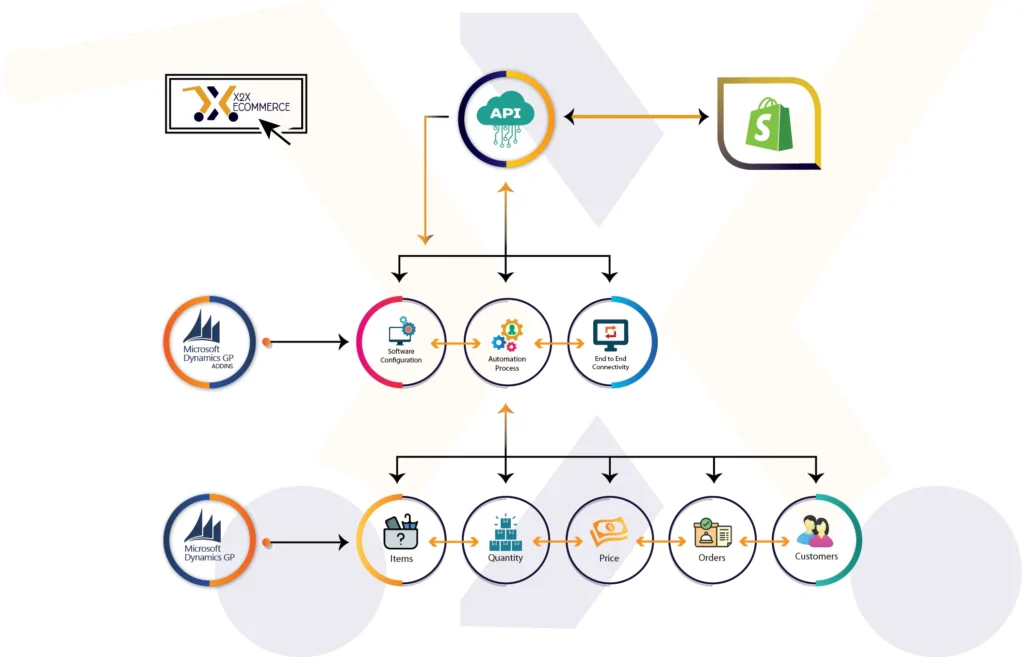
Seamless data flow between Dynamics GP and Shopify, explained.

From Shopify to Dynamics GP
Sales orders with tax, shipping, and payment details.
Customer data creation and updates.
Tax rates and shipment methods.
Order fulfillment and payment status.
From Dynamics GP to Shopify
Categories and sub-categories.
Simple and matrix items with pricing.
Inventory counts and product images.
Customer data and collections.

Advanced Inventory & Matrix Item Management

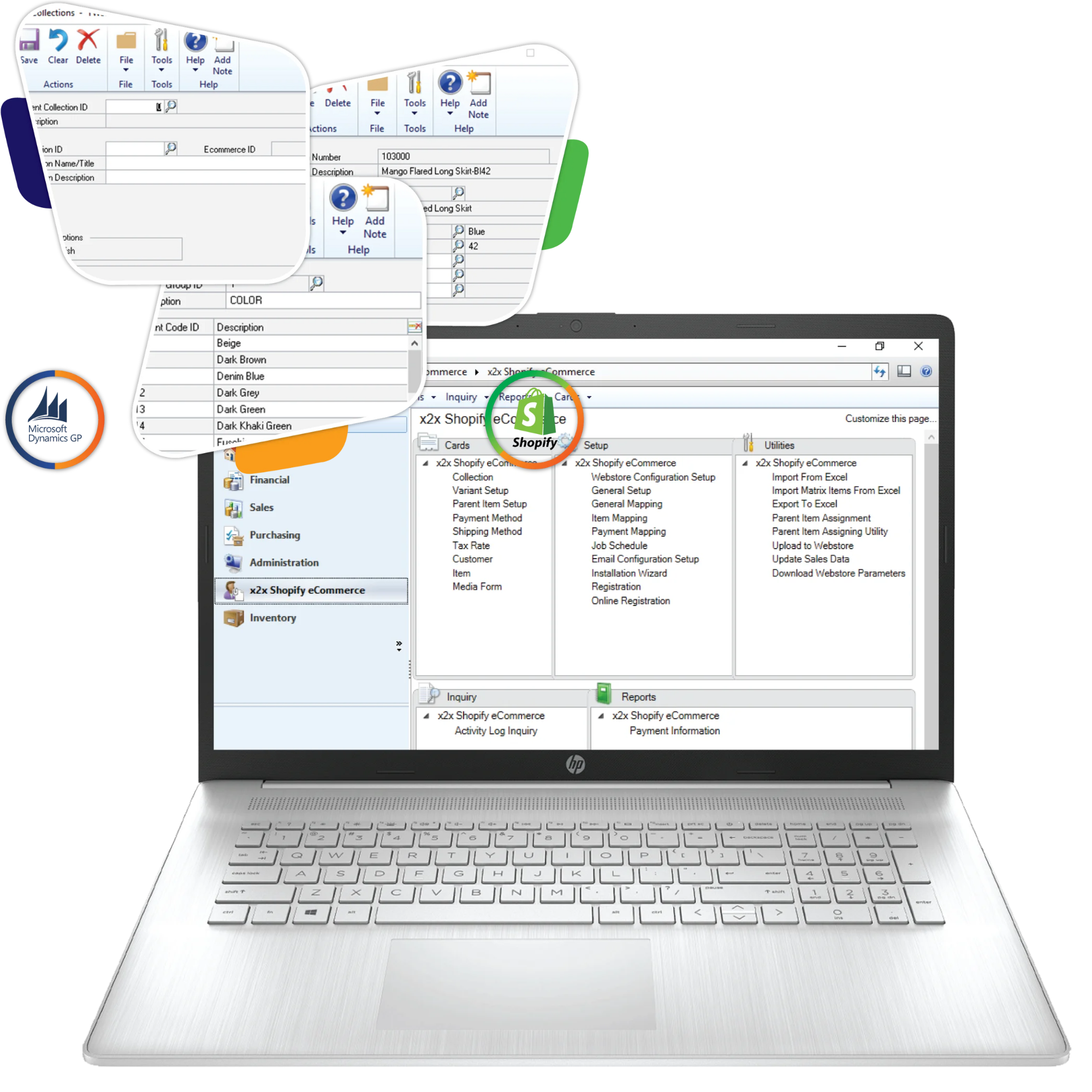
Native Matrix & Variant Support Most connectors fail at handling Shopify Variants. We solve this natively inside GP.

Parent-Child Mapping

Seamlessly link Shopify Variants (Size/Color) to Dynamics GP Items.

Real-Time Sync

Inventory updates in GP reflect instantly on Shopify to prevent overselling.

Smart Catalog

Create Collections in GP and upload them to Shopify automatically.
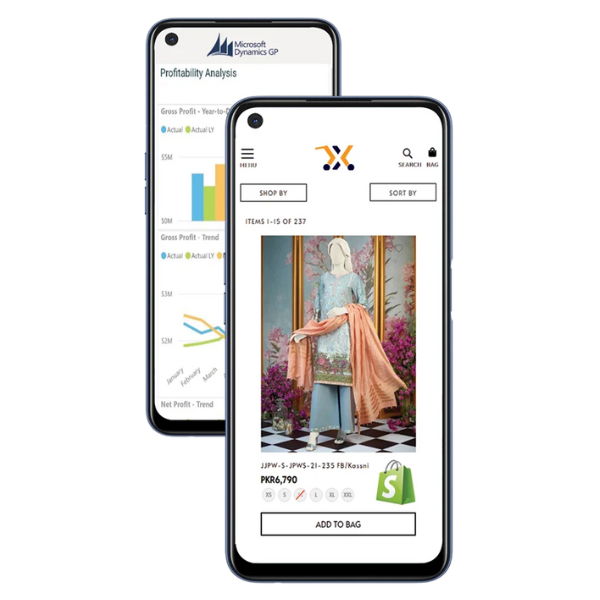
Dynamics GP Shopify in Mobile View

Key Features

Financial & B2B Pricing

Precision Finance Control:

B2B Pricing

Push your existing GP Price Levels to Shopify. Assign specific price lists to specific Customer Class IDs.

Payment Logic

The system captures the Pre-Authorized amount only when the order is invoiced in GP.

Multi-Store Support

Download orders from different Shopify stores into different GP Company Databases.

Logistics & Fulfillment

Automated Shipping Updates:

Tracking Sync

Enter a tracking number in GP, and the system instantly updates Shopify to "Fulfilled" and notifies the customer.

Smart Routing

Route orders to specific GP Site IDs based on inventory availability.

Key Features

x2x GP-Shopify Implementation

Self-Service Model vs Full-Service Model

FEATURESSelf-Service ModelFull-Service Model
Implementation Approach
1 step implementation. x2xsoftware is installed directly on live environment and live Shopify.
2 Step implementation. The x2x software is installed on sandbox environment and Shopify clone. X2x does complete setup and training, helps clients with UAT and on sign off, Implement the system on live environment
Responsibility & Training
Comprehensive training sessions to enable the client to perform all configuration, mapping, and testing. Client assumes full responsibility for business logic mapping, data synchronization setup, and User Acceptance Testing (UAT).
x2x does complete setup and training, helps clients with UAT and on sign off, Implement the system on live environment
Phase 1: Discovery
Scope limited to verify technical readiness for installation. No business process analysis is included in this model.
Full discovery by x2x to gain a comprehensive understanding of business operations and define technical requirements.
Phase 2: Planning
In the Self-Service Model, this task is to be performed by the client
Planning to create a roadmap, and to define the scope, ensure technical readiness.
Phase 3: Prototype - Test Environment
No Test Environment is set in the Self-Service model. The program is installed directly on production environment and live Shopify
Setting up Test Environment setup to build and configure the integration in a sandbox environment to validate functionality.
Phase 4: Internal Testing
Internal Testing requires Test Environment which is not set in the Self-Service model.
Internal Testing is conducted on the test environment with the objective of rigorously testing the integration configuration before exposing it to users.
Phase 5: Training / User Acceptance Testing (UAT)
Configuration Training (Knowledge Transfer) with the objective of training the client’s technical team on how to configure the integration by the client
Comprehensive User Training and assistance with User Acceptance Testing (UAT). Objective: to empower users and validate the system meets business requirements.
Phase 6: Deployment on Live Environment
Installation of x2x Core Engine and x2x BC (Shopify) Module. Confirm the application launches successfully on the server. Verify connectivity ports between the server and the external internet (for Shopify API) are open.
Move the validated configuration to production. Document all final mappings and settings for client records. Install x2x on the production server and import the finalized configuration.
Phase 7: Go Live
Go Live (Client Managed) - The client switches the integration from "Testing" to "Live Production" status.
Go Live - The official switch to the live integration. Setting up change window, roll back plan, and execute the final checklist
Phase 8: Go Live Support
2-week Normalization/Warranty. Support limited to software issues stopped service, installation corruption. Support for Self-service does not cover configuration changes, mapping adjustments, or "how-to" questions.
Go Live Support to ensure stability and provide warranty coverage during the 2-week Normalization/Warranty Period. Immediate availability to address issues arising from live traffic. Fixing any in-scope issues at no additional cost.
PRICE (ONE TIME) ─────────────── ───────────────

X2x GP-Shopify Implementation Phases & Detailed Scope - Comparison

Start

Self-Service Model

Phase 1: Discovery 

Scope limited to verify technical readiness for installation. No business process analysis is included in this model. 

Planning 

In the Self-Service Model, this task is to be performed by the client

Prototype - Test Environment 

No Test Environment is set in the Self-Service model. The program is installed directly on production environment and live Shopify

Internal Testing 

Internal Testing requires Test Environment which is not set in the Self-Service model.

Training / User Acceptance Testing (UAT) 

Configuration Training (Knowledge Transfer) with the objective of training the client’s technical team on how to configure the integration by the client

Deployment on Live Environment 

Installation of x2x Core Engine and x2x BC (Shopify) Module. Confirm the application launches successfully on the server. Verify connectivity ports between the server and the external internet (for Shopify API) are open.

Go Live 

 Go Live (Client Managed) - The client switches the integration from "Testing" to "Live Production" status. 

Go Live Support 

2-week Normalization/Warranty. Support limited to software issues stopped service, installation corruption. Support for Self-service does not cover configuration changes, mapping adjustments, or "how-to" questions.

FEATURES

Phase 1: Discovery 

Full discovery by x2x to gain a comprehensive understanding of business operations and define technical requirements.

Planning 

Planning to create a roadmap, and to define the scope, ensure technical readiness.

Prototype - Test Environment 

Setting up Test Environment setup to build and configure the integration in a sandbox environment to validate functionality. 

Internal Testing 

 Internal Testing is conducted on the test environment with the objective of rigorously testing the integration configuration before exposing it to users. 

Training / User Acceptance Testing (UAT) 

Comprehensive User Training and assistance with User Acceptance Testing (UAT). Objective: to empower users and validate the system meets business requirements. 

Deployment on Live Environment 

Move the validated configuration to production. Document all final mappings and settings for client records. Install x2x on the production server and import the finalized configuration.

Go Live 

Go Live - The official switch to the live integration. Setting up change window, roll back plan, and execute the final checklist

Go Live Support 

 Go Live Support to ensure stability and provide warranty coverage during the 2-week Normalization/Warranty Period. Immediate availability to address issues arising from live traffic. Fixing any in-scope issues at no additional cost.
theme-15

Calculate Your ROI with x2x Integration

Discover how much you can save and earn by integrating Dynamics GP with Shopify.

Time Savings: $1600.00/month

Error Cost Savings: $1250.00/month

Sales Growth: $5000.00/month

Total Monthly ROI: $7850.00

Visualize the Integration

See how x2x connects Dynamics GP and Shopify for seamless data flow chart.

Built for Microsoft Dynamics GP

1

Supported Versions

GP 2013, 2015, 2016, 2018, and Modern Lifecycle.
2

Connectivity

Direct SQL & eConnect (No 3rd Party Cloud).
3

Logs

Full activity logs for successful/failed transmissions.
4

Job Scheduler

Set upload/download frequency (e.g., every 5 minutes).
Demo Video

See GP + Shopify in Action

Ready to Automate Your Operations? Join merchants who switched to the Native Dynamics GP Module.

Frequently Asked Questions

Yes. Our module adds a "Matrix Item" feature to GP, allowing you to link Parent and Child items (Size/Color) and sync them natively.

Extremely secure. Unlike middleware, the x2x Native Module resides within your firewall and communicates directly via secure ports.

Yes. We map GP Price Levels to Shopify, allowing you to offer specific pricing to B2B customers automatically.

Testimonial

See How We’ve Helped Businesses Grow

Real results, real growth. See how x2x helps businesses streamline workflows, cut errors, and scale smarter with intelligent integrations.

Some of our valued clients

At vero eos et accusamus et iusto odio digni goikussimos ducimus qui to bonfo blanditiis praese. Ntium voluum deleniti atque.

Melbourne, Australia
(Sat - Thursday)
(10am - 05 pm)